Here in this article I am going to explain How to send formatted text messages in WhatsApp Chat in Android Phones.
If you want to send Message in Bold type add the asterisk (*) before and after your text message
*text*
If you want to send Message in Italic type add the underscore (_) before and after your text message
_text_
If you want to send Message as Strikethrough add a tilde (~) before and after your text message
~text~
If you want to send Message as Monospace type three backticks before and after your text message
```text```
Also in Android phone we can use the shotcuts by Tap and hold the text that is entering in the text field and then select the options that are available for the bold, italic in the list.
You can also check in the youtube link
https://youtu.be/xegyvE8RVfs
Saturday, February 27, 2021

Friday, February 26, 2021
Wallpaper Carousel - How to Disable Lock Screen Wallpaper Carousel In MIUI
In this artcile I am going to explain How to Disable the Lock Screen Wallpaper Carousel. Please find the steps below to disable to Wallpaper Carousel..
Steps:
1) In mobile phone click on the Settings.
2) In the Settings -> Search Box type the text Wallpaper.
3) It will display all the apps that are having the text Wallpaper. Select the Wallpaper Carousel.
4) When you click the Wallpaper Carousel it will display the Option Turn On or Off button.
5) Click the Turn On or Off Button to Enable or Disable the Wallpaper Carousel on mobile phone Lock Screen.
Please see the below screen shot.

You can also view the same in the Youtube Link
https://www.youtube.com/watch?v=ORNObSN_sTo
Steps:
1) In mobile phone click on the Settings.
2) In the Settings -> Search Box type the text Wallpaper.
3) It will display all the apps that are having the text Wallpaper. Select the Wallpaper Carousel.
4) When you click the Wallpaper Carousel it will display the Option Turn On or Off button.
5) Click the Turn On or Off Button to Enable or Disable the Wallpaper Carousel on mobile phone Lock Screen.
Please see the below screen shot.

You can also view the same in the Youtube Link
https://www.youtube.com/watch?v=ORNObSN_sTo
Thursday, February 18, 2021
GMAIL - How to Edit or Delete contacts in Gmail Contacts List
In this article I am going to explain how to Edit or Delete Gmail Contats.
Steps :
1. Login into your GMAIL Account.
2. Open the Link in the another tab https://contacts.google.com/
3. It will display all the contacts that are available in your gmail account.
4. Move the cursor on the contact which you need to edit. It will dislay the Edit Contact option. Click on Edit it will open a popup window. Now you can edit the contact details and click on save. Please check the screen shot below.
 5. To Delete the contact, Move the cursor to the contact you want to delete. In the Contact it will show three dots. Click on the three dots it will show you the menu item where you can select the delete option. It will remove the contact from your contact list. Please check the screen shot below

You can also view the same in below youtube channel link
https://www.youtube.com/watch?v=k-SXU54udEk
Steps :
1. Login into your GMAIL Account.
2. Open the Link in the another tab https://contacts.google.com/
3. It will display all the contacts that are available in your gmail account.
4. Move the cursor on the contact which you need to edit. It will dislay the Edit Contact option. Click on Edit it will open a popup window. Now you can edit the contact details and click on save. Please check the screen shot below.


You can also view the same in below youtube channel link
https://www.youtube.com/watch?v=k-SXU54udEk
Tuesday, January 26, 2021
How to Close Your LinkedIn Account
In this article I am going to explain how to Close your LinkedIn account permanently deleting your profile and removing access to all your LinkedIn information from the site.
Steps:
To close your LinkedIn account
Step1: You need to LogIn into your LinkedIn account.
Step2: Select the tab under your profile picture in the top toolbar
Step3: Select the option “Settings and Privacy” from the dropdown menu
Step4: In the “Account” tab select the option “Closing Your LinkedIn Account”
Step5: You can select the reason for closing your account and click “Next” button. Select the option “other” if none of the reasons apply to you and then you click “Next” button.
Step6: Enter your password and select the option “Close Account” button.
Same is explained in the youtube channel
https://www.youtube.com/embed/VG4XFl36WaU
Steps:
To close your LinkedIn account
Step1: You need to LogIn into your LinkedIn account.
Step2: Select the tab under your profile picture in the top toolbar
Step3: Select the option “Settings and Privacy” from the dropdown menu
Step4: In the “Account” tab select the option “Closing Your LinkedIn Account”
Step5: You can select the reason for closing your account and click “Next” button. Select the option “other” if none of the reasons apply to you and then you click “Next” button.
Step6: Enter your password and select the option “Close Account” button.
Same is explained in the youtube channel
https://www.youtube.com/embed/VG4XFl36WaU
Monday, January 25, 2021
Excel - Date functions
I am going to explain Microsoft Excel Date funtions in the below article. Microsoft Excel provides a bunch of Date functions to work with dates and times values. Here I am going to explain most of the time we use to calculate Age, Date formats and difference between two days with the samples.
TEXT Funtion
The TEXT function uses to convert dates to a text string.
Syntax : TEXT(value, format_text)
With the syntax of TEXT(value, format_text) function, we can change the dates to text strings in a variety of formats. Some sample formats are as explained in the following below screenshot.

DATEDIF Funtions
DATEDIF function is used to calculate the difference between two dates in days, months or years.
Syntax : DATEDIF(start_date, end_date, unit)
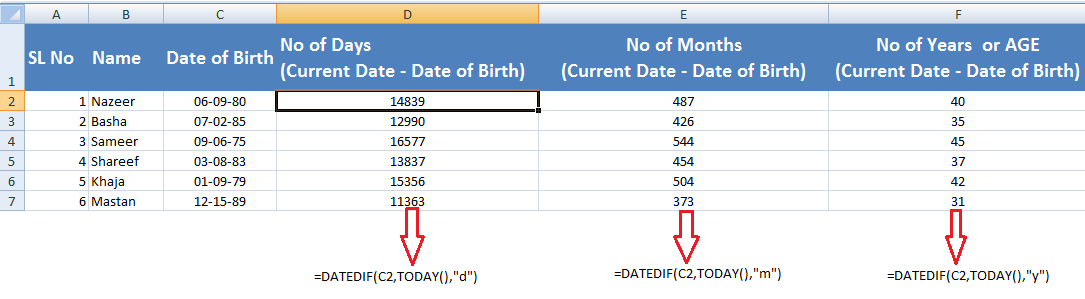
We have to provide the Unit argument as d, m or y to retun the no of days, months or years. Below I have provided the sample and also the same explained in the screen shot.
=DATEDIF(C2, TODAY(), "d") - This will calculates the number of days between the cell value in C2 and today's date.
=DATEDIF(C2, TODAY(), "m") - This will returns the number of complete months between the dates in C2 and today's date.
=DATEDIF(C2, TODAY(), "y") - This will returns the number of complete years between the dates in C2 and today's date.

Calculating the difference between two dates columns are explained in the below screen shot. The screen shot showing is no of years differrence in the two days. If you want no of days between the two days you have to give unit section as d instedad of y in quotation marks.

You can also view the same in the below you tube link
https://www.youtube.com/watch?v=KS-GiSNV7cY
TEXT Funtion
The TEXT function uses to convert dates to a text string.
Syntax : TEXT(value, format_text)
With the syntax of TEXT(value, format_text) function, we can change the dates to text strings in a variety of formats. Some sample formats are as explained in the following below screenshot.

DATEDIF Funtions
DATEDIF function is used to calculate the difference between two dates in days, months or years.
Syntax : DATEDIF(start_date, end_date, unit)
We have to provide the Unit argument as d, m or y to retun the no of days, months or years. Below I have provided the sample and also the same explained in the screen shot.
=DATEDIF(C2, TODAY(), "d") - This will calculates the number of days between the cell value in C2 and today's date.
=DATEDIF(C2, TODAY(), "m") - This will returns the number of complete months between the dates in C2 and today's date.
=DATEDIF(C2, TODAY(), "y") - This will returns the number of complete years between the dates in C2 and today's date.
Calculating the difference between two dates columns are explained in the below screen shot. The screen shot showing is no of years differrence in the two days. If you want no of days between the two days you have to give unit section as d instedad of y in quotation marks.

You can also view the same in the below you tube link
https://www.youtube.com/watch?v=KS-GiSNV7cY
Friday, December 25, 2020
WhatsApp - How to Change PIN, Add Email Address and Update Email Address in Two step verification in WhatsApp
In this artcile I am going to explain how to Change PIN in Two step verification in WhatsApp. We have an option to change the PIN or update the email address associated with two-step verification.
To Enable the Two Step verification please follow the Below Steps:
1) Click on three dots in WhatsApp right top righ side and click on WhatsApp Settings.
2) Now Clik on Account > Clik on Two-step verification > Clik on Change PIN.
3) In the Next screen it will ask for the Six Digit secret PIN Number.
4) Enter a six-digit PIN of your choice and confirm it.
7) Click on Save and Your PIN Set.
You can also check the Change PIN in two steps verifiation in the below Youtube Channel.
How to Change PIN in Two step verification in WhatsApp
Check the below steps if you want to Add or Chane the Email Addres in WhatsApp Two Step Verification
To Add an email address.
1) Click on three dots in WhatsApp right top righ side and click on WhatsApp Settings.
2) Click on Account > Click on Two-step verification > Click on Add Email Address.
To Change an email address.
1) Click on three dots in WhatsApp right top righ side and click on WhatsApp Settings.
2) Click on Account > Click on Two-step verification > Click on Change Email Address.
To Enable the Two Step verification please follow the Below Steps:
1) Click on three dots in WhatsApp right top righ side and click on WhatsApp Settings.
2) Now Clik on Account > Clik on Two-step verification > Clik on Change PIN.
3) In the Next screen it will ask for the Six Digit secret PIN Number.
4) Enter a six-digit PIN of your choice and confirm it.
7) Click on Save and Your PIN Set.
You can also check the Change PIN in two steps verifiation in the below Youtube Channel.
How to Change PIN in Two step verification in WhatsApp
Check the below steps if you want to Add or Chane the Email Addres in WhatsApp Two Step Verification
To Add an email address.
1) Click on three dots in WhatsApp right top righ side and click on WhatsApp Settings.
2) Click on Account > Click on Two-step verification > Click on Add Email Address.
To Change an email address.
1) Click on three dots in WhatsApp right top righ side and click on WhatsApp Settings.
2) Click on Account > Click on Two-step verification > Click on Change Email Address.
WhatsApp - How to Enable and Disable Two step verification in WhatsApp
In this artcile I am going to explain how to Enable and Disable Two step verification in WhatsApp. This Two-step verification is an optional feature in WhatsApp that adds more security to your WhatsApp account. We have the option to enable or disable this feature in WhatsApp an also to change the PIN or update the email address associated with two-step verification.
To Enable the Two Step verification please follow the Below Steps:
1) Click on three dots in WhatsApp right top righ side and click on WhatsApp Settings.
2) Now Clik on Account > Clik on Two-step verification > Clik on Enable.
3) In the Next screen it will ask for the Six Digit secret PIN Number.
4) Enter a six-digit PIN of your choice and confirm it.
5) It next page it will ask for Email Address.
6) Now you can provide an email address or Click on Skip if you don’t want to add an email address. Adding an email address allows you to reset two-step verification and helps you to safeguard your account.
7) Click on Next.
8) Confirm the email address and Click on Save or Done.
You can also check the two steps verifiation enable in the below Youtube Channel.
How to Enabel two step verification in WhatsApp
To Disable the Two Step verification please follow the Below Steps:
1) Click on three dots in WhatsApp right top righ side and click on WhatsApp Settings.
2) Click on Account >Click on Two-step verification > Click on Disable > Click on Disable.
You can also check the two steps verifiation Disable in the below Youtube Channel.
How to Disable two step verification in WhatsApp
To Enable the Two Step verification please follow the Below Steps:
1) Click on three dots in WhatsApp right top righ side and click on WhatsApp Settings.
2) Now Clik on Account > Clik on Two-step verification > Clik on Enable.
3) In the Next screen it will ask for the Six Digit secret PIN Number.
4) Enter a six-digit PIN of your choice and confirm it.
5) It next page it will ask for Email Address.
6) Now you can provide an email address or Click on Skip if you don’t want to add an email address. Adding an email address allows you to reset two-step verification and helps you to safeguard your account.
7) Click on Next.
8) Confirm the email address and Click on Save or Done.
You can also check the two steps verifiation enable in the below Youtube Channel.
How to Enabel two step verification in WhatsApp
To Disable the Two Step verification please follow the Below Steps:
1) Click on three dots in WhatsApp right top righ side and click on WhatsApp Settings.
2) Click on Account >Click on Two-step verification > Click on Disable > Click on Disable.
You can also check the two steps verifiation Disable in the below Youtube Channel.
How to Disable two step verification in WhatsApp
Subscribe to:
Posts (Atom)